Guide
How to make Claude and Cursor use your design system
Last updated 6 November 2026
Ask an AI coding agent for a settings page and it will write one. It will also invent its own grey, its own spacing and its own button. Below is how to make an agent build with the components and tokens you already have, and how to check that it did. The examples come from the pack that ships with Tessera.
The short answer
To make Claude or Cursor use your design system, give the agent four things it can read in the project: a short rules file it loads on every task, a list of your components with every prop, a few finished screens to copy from, and a check it can run that fails on raw values. Tessera ships all four in its package. The rules file and the list matter most, because an agent cannot use a component it does not know exists.
Why agents ignore your design system
An agent writes the code it has seen most often. Left alone, that means generic markup and whatever colour looks close enough. It does not know that your team has a Table with sorting built in, or that the page background has its own token. Telling it once in a chat does not last, because the next task starts fresh.
What lasts is files in the repository that the agent reads on every task, and a check that catches it when it slips.
Write rules the agent reads on every task
Claude Code reads a CLAUDE.md file in the project on every task. Cursor reads its own rules files in .cursor/rules and an AGENTS.md file. Keep the rules short and concrete. Ours has twelve, and each one names the exact thing to do:
1. Use the components before you write markup. Import from tessera-ds.
   If a component exists, use it; do not rebuild it with divs.
2. Use tokens, never raw values. No hex, rgb(), px sizes, raw z-index
   or raw milliseconds in CSS. Run npx tessera-lint src.
8. If something is missing, say so and propose a new component or token.
Do not work around it with one-off CSS.- Name colours by meaning. Our rules say which token is the page background and which one is a card, because an agent that puts a card colour on the page makes fields vanish in dark mode.
- Say how light and dark work: one theme provider, never a second set of dark colours.
- Tell it what to do when something is missing. Rule eight is the one that stops one-off CSS.
Give it the components in a form it can read
An agent cannot open your Figma file or your docs site in the middle of a task, so the component list has to be a file in the project. Ours, components.md, is generated from the code: all 62 components, each with its import line and every prop with its type and default. The same list exists as code-spec.json for tools that want data.
Generating it matters. A list written by hand is out of date after the next release, and an agent will trust it anyway.
Use the same words as in Figma. When a design says variant=brand, the prop is variant="brand". Then the agent, the designer and the developer read the same name, and nobody translates. How we keep those names aligned is in how to keep Figma variables and CSS tokens in sync.
Let it start from a real screen
An agent copies well. A whole screen built only from your components teaches it more than any rule: which components go together, how much space sits between blocks, what a table row with a status looks like. The Tessera package has six such screens as code: sign in, inbox, finance dashboard, transactions, settings and profile. The skill file in the pack tells the agent to look for the nearest one first and change it.
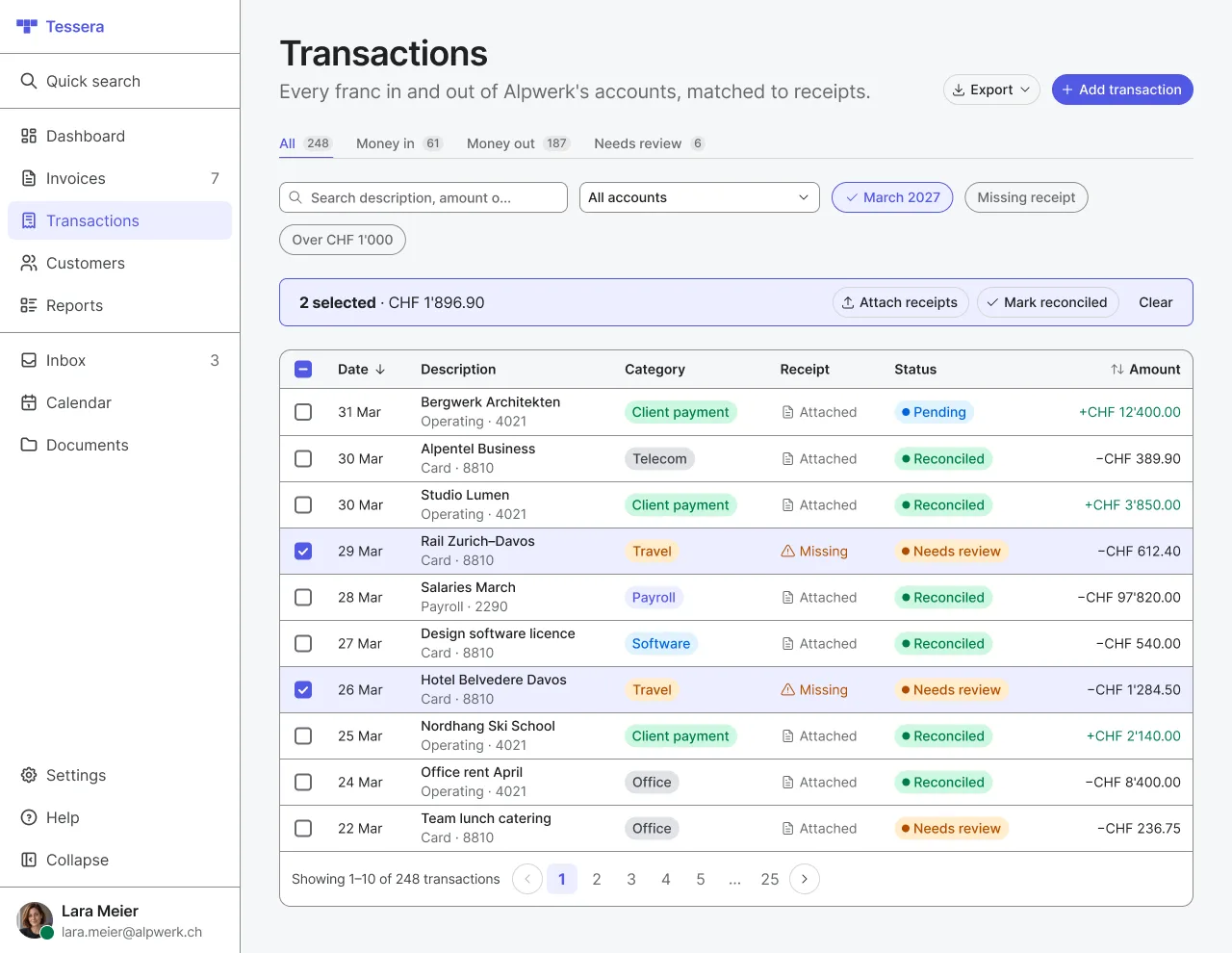
For the layout choices behind screens like this one, read how to design an admin dashboard.
Check the result with a machine
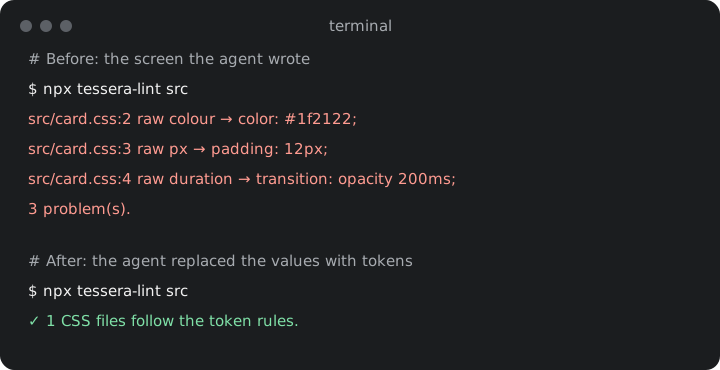
Rules lower the number of slips. A check finds the rest. Ask the agent to run the lint at the end of every task and fix what it reports:
npx tessera-lint srcIt fails on a colour written as hex, rgb() or hsl(), a px value, a z-index, an opacity or a duration typed into CSS, and on a media query width that is not a breakpoint token. Because it runs in the terminal, the agent sees the failure and fixes it without you.
Setup in Claude Code and in Cursor
With Tessera installed, one command copies the pack into the folder Claude Code reads:
cp -r node_modules/tessera-ds/claude/. .claude/
npx tessera-lint src- Claude Code then finds the rules in .claude/CLAUDE.md, the build steps as a skill in .claude/skills/tessera, and the component list in .claude/components.md.
- Cursor does not read the .claude folder. Copy the text of CLAUDE.md into AGENTS.md at the project root or into a rule in .cursor/rules, and point it to .claude/components.md. The lint works the same way in any editor.
- On Windows Command Prompt, use copy, or run the first command in PowerShell.
The full install, from an empty React app to the first screen, is on Get started.
What this does not solve
- The lint reads CSS files only. A colour written as an inline style in a component file is not caught.
- An agent can still pick the wrong component for the job, such as a dialog where a page would be calmer. Rules reduce that; review still catches it.
- It cannot see the screen. Check every new screen in the browser, in light and in dark, and with the keyboard.
- The pack is written for Claude. Cursor works with the same text, but you copy it into its own files yourself.
What you get in Tessera
- The pack in the package: the rules, a skill with the build steps, and the component list generated from the code.
- code-spec.json with every component and its props, for tools that read data.
- Six full screens as code to start from.
- npx tessera-lint src, the check the agent runs.
The pack comes with Pro. The free kit has the Figma side, and the components with every prop are listed in the docs. If you are weighing this against building your own system, read build or buy a design system. Plans are on pricing.